

미적분학에서 두 개의 서로 다른 점이나 집합을 연결하는 함수가 반드시 존재하는지에 대한 질문은 매우 중요한 문제이다. 이 학습지에서는 연속함수(continuous function)와 미분가능함수(differentiable function)의 존재성을 보장하는 두 가지 중요한 정리를 살펴본다.
티체 확장 정리(Tietze Extension Theorem)
티체 확장 정리는 닫힌 집합(closed set)에서 정의된 연속함수를 전체 공간으로 확장할 수 있음을 보장한다.
정리: $X$가 normal space이고, $A \subset X$가 closed set일 때, $A$에서 정의된 연속함수 $f: A \rightarrow \mathbb{R}$에 대해 $F: X \rightarrow \mathbb{R}$인 연속함수가 존재하여 $F|_A = f$이다.
평면 $\mathbb{R}^2$ 위에 서로 떨어져 있는 두 개의 닫힌 원판을 생각해보자:
- $A_1$: 중심이 $(-2, 0)$이고 반지름이 1인 원판
- $A_2$: 중심이 $(2, 0)$이고 반지름이 1인 원판
각 원판에서 다음과 같이 함수를 정의한다:
- $f(x) = 0$ for all $x \in A_1$
- $f(x) = 1$ for all $x \in A_2$
거리 함수를 이용한 확장
티체 정리를 이용하면 다음과 같은 함수를 구성할 수 있다:
$$g(\mathbf{x}) = \frac{d(\mathbf{x}, A_1)}{d(\mathbf{x}, A_1) + d(\mathbf{x}, A_2)}$$
여기서 $d(\mathbf{x}, A_i)$는 점 $\mathbf{x}$에서 집합 $A_i$까지의 거리이다.
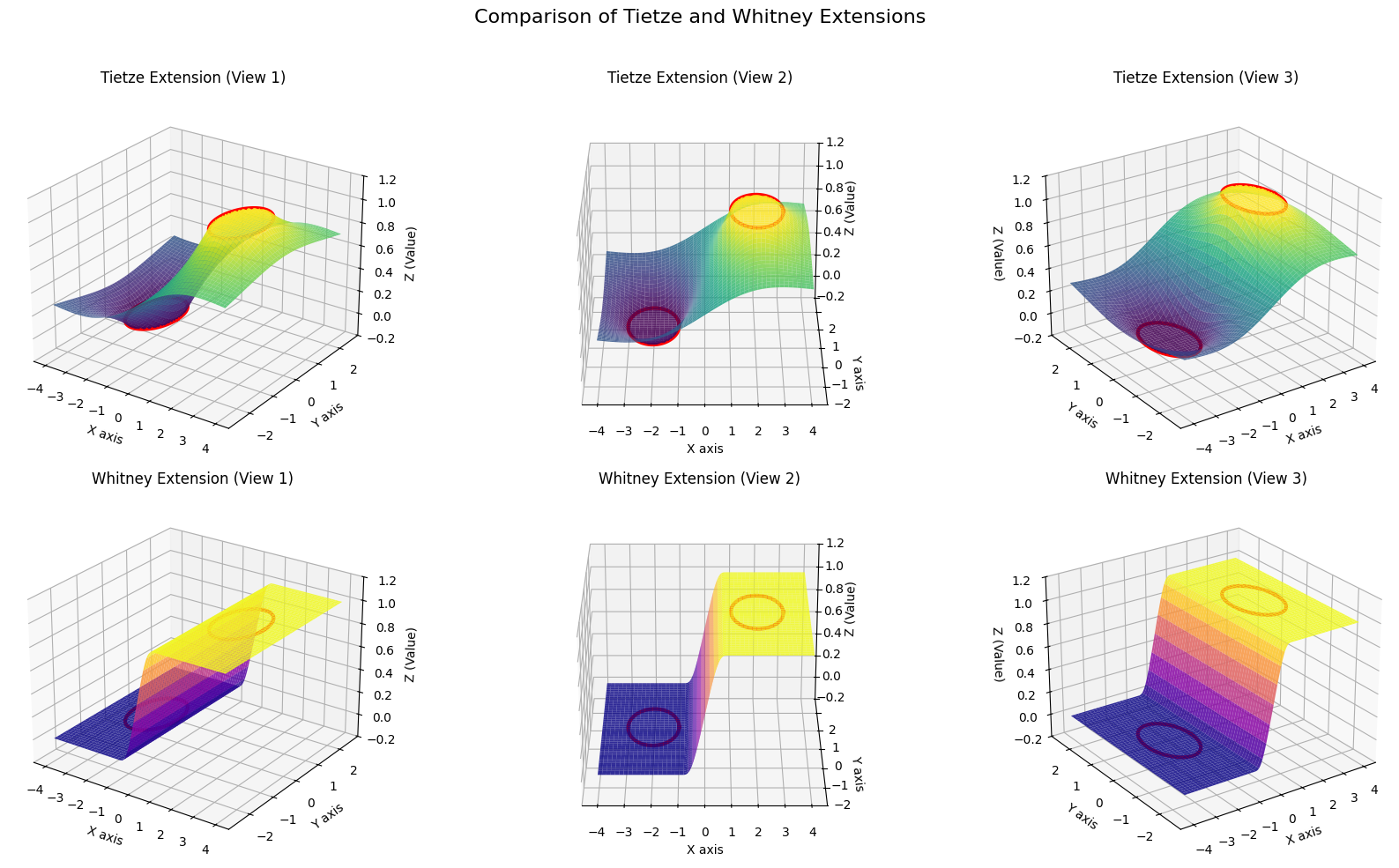
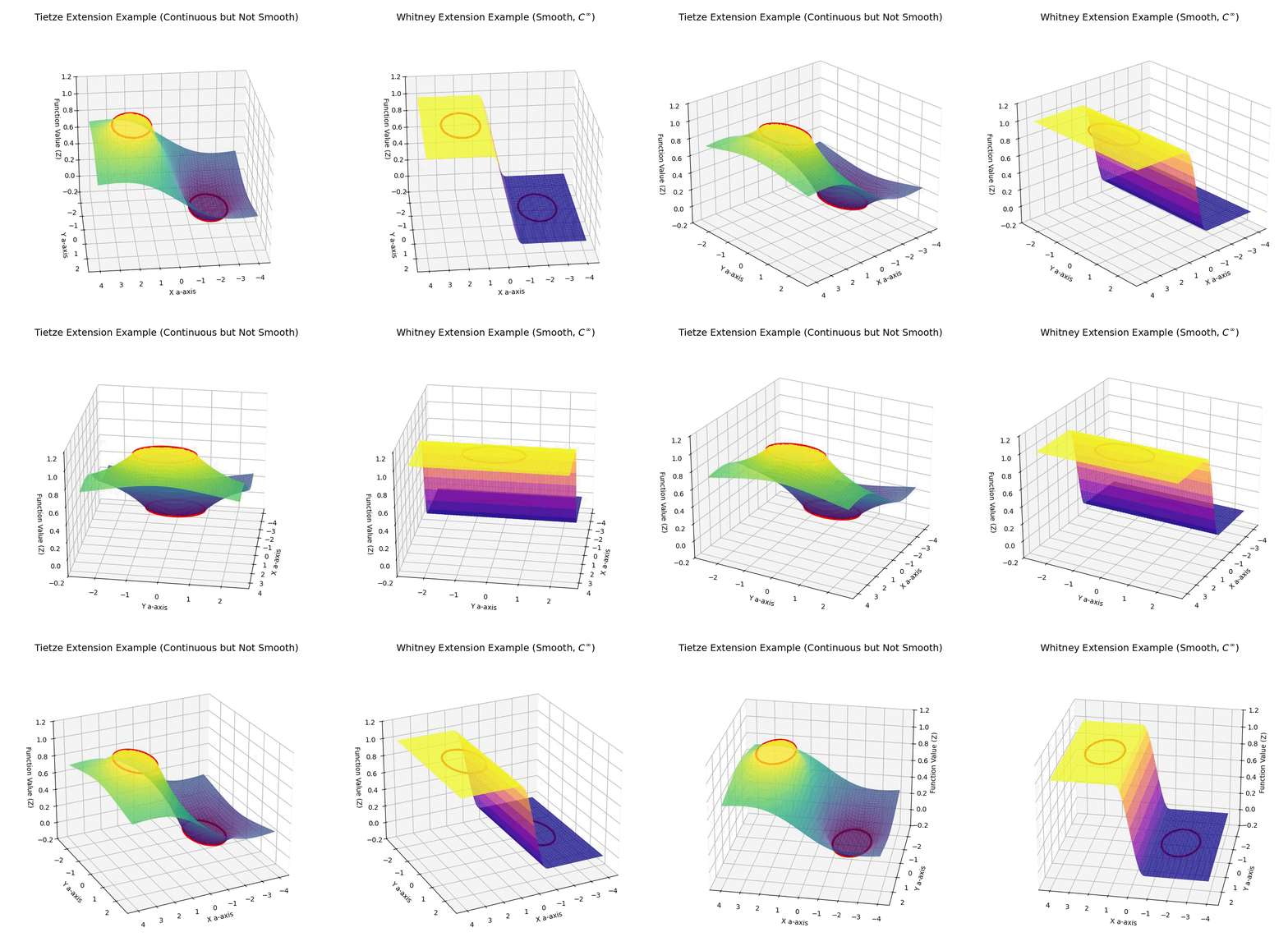
시각적 특징
- 연속성 보장: 함수 그래프가 끊어지지 않는다
- 경계에서의 각: 두 원판의 경계 근처에서 날카로운 주름(crease)이 나타날 수 있다
- 미분불가능성: 이러한 주름 때문에 일부 점에서 미분이 불가능하다
휘트니 확장 정리(Whitney Extension Theorem)
휘트니 확장 정리는 닫힌 집합에서 정의된 함수를 무한히 미분가능한(infinitely differentiable) 함수로 확장할 수 있음을 보장한다.
정리: $E \subset \mathbb{R}^n$이 closed set이고, $E$ 위에서 정의된 함수 $f$가 적절한 조건을 만족하면, $\mathbb{R}^n$ 전체에서 정의된 $C^\infty$ 함수 $F$가 존재하여 적당한 의미에서 $F$가 $E$ 위에서 $f$를 확장한다.
동일한 두 원판 $A_1$, $A_2$에서 같은 값을 갖는 함수를 고려한다. 휘트니 정리에 의해 구성되는 확장 함수는 매끄러운 전환 함수(smooth transition function)를 사용한다.
매끄러운 전환 함수
다음과 같은 bump function을 이용한다:
$$\phi(t) = \begin{cases}
0 & \text{if } t \leq 0 \
\exp(-1/t) & \text{if } t > 0
\end{cases}$$
이를 이용하여 매끄러운 전환을 만든다:
$$\psi(t) = \frac{\phi(t)}{\phi(t) + \phi(1-t)} \quad \text{for } t \in (0,1)$$
시각적 특징
- 완벽한 매끄러움: 어떤 지점에서도 각이나 주름이 없다
- 무한 미분가능성: 모든 차수의 도함수가 존재한다
- 자연스러운 전환: 두 영역 사이의 연결이 매우 부드럽다
두 정리의 핵심 차이점
| 특성 | 티체 확장 정리 | 휘트니 확장 정리 |
|---|---|---|
| 보장하는 성질 | 연속성($C^0$) | 무한 미분가능성($C^\infty$) |
| 구성의 복잡도 | 상대적으로 간단 | 매우 복잡 |
| 시각적 모습 | 날카로운 주름 가능 | 완벽하게 매끄러운 곡면 |
| 응용 분야 | 위상수학, 일반적인 연속성 문제 | 미분기하학, 매끄러운 다양체 이론 |
시뮬레이션 사진
import numpy as np
import matplotlib.pyplot as plt
from mpl_toolkits.mplot3d import Axes3D

# 3D 그래프 설정을 위한 함수
def setup_plot(ax, title, elev=25, azim=-55):
    """3D 그래프의 축, 제목, 시점 등을 설정합니다."""
    ax.set_xlabel('X axis')
    ax.set_ylabel('Y axis')
    ax.set_zlabel('Z (Value)')
    ax.set_title(title, fontsize=12)
    ax.view_init(elev=elev, azim=azim)
    ax.set_zlim(-0.2, 1.2)
    ax.set_facecolor('white')

# 도메인 설정: X-Y 평면
x_coords = np.linspace(-4, 4, 200)
y_coords = np.linspace(-2.5, 2.5, 200)
X, Y = np.meshgrid(x_coords, y_coords)

# 두 개의 닫힌 원판 A1, A2 정의
center1, radius1 = np.array([-2, 0]), 1
center2, radius2 = np.array([2, 0]), 1

# 1. 티체 확장 정리 예시 함수
def distance_to_disk(x, y, center, radius):
    dist_from_center = np.sqrt((x - center[0])**2 + (y - center[1])**2)
    return np.maximum(0, dist_from_center - radius)

def tietze_extension_func(x, y):
    d1 = distance_to_disk(x, y, center1, radius1)
    d2 = distance_to_disk(x, y, center2, radius2)
    denominator = d1 + d2
    return d1 / (denominator + 1e-9)

# 2. 휘트니 확장 정리 예시 함수
def smooth_step(t):
    phi = lambda val: np.exp(-1. / val) * (val > 0)
    return np.piecewise(t, [t <= 0, (t > 0) & (t < 1), t >= 1],
                        [0, lambda val: phi(val) / (phi(val) + phi(1 - val)), 1])

def whitney_extension_func(x, y):
    normalized_x = (x + 1) / 2.0
    return smooth_step(normalized_x)

# Z값 계산
Z_tietze = tietze_extension_func(X, Y)
Z_whitney = whitney_extension_func(X, Y)

# A1, A2의 경계를 그리기 위한 데이터
theta = np.linspace(0, 2 * np.pi, 100)
x_circle1 = center1[0] + radius1 * np.cos(theta)
y_circle1 = center1[1] + radius1 * np.sin(theta)
x_circle2 = center2[0] + radius2 * np.cos(theta)
y_circle2 = center2[1] + radius2 * np.sin(theta)

# 2x3 서브플롯 생성
fig, axes = plt.subplots(2, 3, figsize=(18, 10), subplot_kw={'projection': '3d'})
view_angles = [-55, -90, -125] # 세 가지 다른 시점(방위각)

# 티체 확장 그래프들
for i, azim_angle in enumerate(view_angles):
    ax = axes[0, i]
    ax.plot_surface(X, Y, Z_tietze, cmap='viridis', edgecolor='none', alpha=0.85)
    ax.plot(x_circle1, y_circle1, 0, color='red', linewidth=3)
    ax.plot(x_circle2, y_circle2, 1, color='red', linewidth=3)
    setup_plot(ax, f'Tietze Extension (View {i+1})', azim=azim_angle)

# 휘트니 확장 그래프들
for i, azim_angle in enumerate(view_angles):
    ax = axes[1, i]
    ax.plot_surface(X, Y, Z_whitney, cmap='plasma', edgecolor='none', alpha=0.85)
    ax.plot(x_circle1, y_circle1, 0, color='red', linewidth=3)
    ax.plot(x_circle2, y_circle2, 1, color='red', linewidth=3)
    setup_plot(ax, f'Whitney Extension (View {i+1})', azim=azim_angle)

fig.suptitle('Comparison of Tietze and Whitney Extensions', fontsize=16)
plt.tight_layout(rect=[0, 0, 1, 0.96])
plt.show()
시뮬레이션 영상
import numpy as np
import matplotlib.pyplot as plt
from mpl_toolkits.mplot3d import Axes3D
from matplotlib.animation import FuncAnimation

# 3D 그래프 설정을 위한 함수
def setup_plot(ax, title):
    """3D 그래프의 축, 제목, 시점 등을 설정합니다."""
    ax.set_xlabel('X a-axis')
    ax.set_ylabel('Y a-axis')
    ax.set_zlabel('Function Value (Z)')
    ax.set_title(title, fontsize=14, pad=20)
    ax.set_zlim(-0.2, 1.2)
    ax.set_facecolor('white') # 배경을 흰색으로 설정하여 가시성 높임

# 도메인 설정: X-Y 평면
x_coords = np.linspace(-4, 4, 200)
y_coords = np.linspace(-2.5, 2.5, 200)
X, Y = np.meshgrid(x_coords, y_coords)

# 두 개의 닫힌 원판 A1, A2 정의
center1, radius1 = np.array([-2, 0]), 1
center2, radius2 = np.array([2, 0]), 1

# 1. 티체 확장 정리 예시 함수 (거리 함수 이용)
def distance_to_disk(x, y, center, radius):
    """점 (x,y)에서 원판까지의 거리를 계산합니다."""
    dist_from_center = np.sqrt((x - center[0])**2 + (y - center[1])**2)
    return np.maximum(0, dist_from_center - radius)

def tietze_extension_func(x, y):
    """거리 함수를 이용한 티체 확장 함수 g(x)"""
    d1 = distance_to_disk(x, y, center1, radius1)
    d2 = distance_to_disk(x, y, center2, radius2)
    denominator = d1 + d2
    return d1 / (denominator + 1e-9)

# 2. 휘트니 확장 정리 예시 함수 (매끄러운 함수 이용)
def smooth_step(t):
    """0과 1 사이를 C-무한급으로 매끄럽게 전환하는 함수"""
    phi = lambda val: np.exp(-1. / val) * (val > 0)
    return np.piecewise(t, [t <= 0, (t > 0) & (t < 1), t >= 1],
                        [0, lambda val: phi(val) / (phi(val) + phi(1 - val)), 1])

def whitney_extension_func(x, y):
    """매끄러운 전환 함수를 이용한 휘트니 확장 함수의 예시"""
    normalized_x = (x + 1) / 2.0
    return smooth_step(normalized_x)

# Z값 계산
Z_tietze = tietze_extension_func(X, Y)
Z_whitney = whitney_extension_func(X, Y)

# A1, A2의 경계를 그리기 위한 데이터
theta = np.linspace(0, 2 * np.pi, 100)
x_circle1 = center1[0] + radius1 * np.cos(theta)
y_circle1 = center1[1] + radius1 * np.sin(theta)
x_circle2 = center2[0] + radius2 * np.cos(theta)
y_circle2 = center2[1] + radius2 * np.sin(theta)

# 그래프 그리기 및 애니메이션 설정
fig = plt.figure(figsize=(16, 8))

ax1 = fig.add_subplot(1, 2, 1, projection='3d')
ax2 = fig.add_subplot(1, 2, 2, projection='3d')

# 표면 플롯
surf1 = ax1.plot_surface(X, Y, Z_tietze, cmap='viridis', edgecolor='none', alpha=0.8)
surf2 = ax2.plot_surface(X, Y, Z_whitney, cmap='plasma', edgecolor='none', alpha=0.8)

# A1, A2 경계선 플롯 (Z=0 또는 Z=1 평면에 표시)
ax1.plot(x_circle1, y_circle1, 0, color='red', linewidth=3, label='$A_1$ Boundary')
ax1.plot(x_circle2, y_circle2, 1, color='red', linewidth=3, label='$A_2$ Boundary')
ax2.plot(x_circle1, y_circle1, 0, color='red', linewidth=3, label='$A_1$ Boundary')
ax2.plot(x_circle2, y_circle2, 1, color='red', linewidth=3, label='$A_2$ Boundary')

# 그래프 설정
setup_plot(ax1, 'Tietze Extension Example (Continuous but Not Smooth)')
setup_plot(ax2, 'Whitney Extension Example (Smooth, $C^\infty$)')

# 애니메이션 함수 정의
def animate(i):
    """각 프레임에서 카메라의 시점을 업데이트합니다."""
    ax1.view_init(elev=25, azim=i)
    ax2.view_init(elev=25, azim=i)
    return fig,

# 애니메이션 생성 및 저장
# HTML5 비디오로 저장 (jupyter/colab 환경에서 재생 가능)
anim = FuncAnimation(fig, animate, frames=np.arange(0, 360, 2), interval=50, blit=True)

# IPython.display.HTML을 사용하여 Colab/Jupyter에서 비디오 출력
from IPython.display import HTML
HTML(anim.to_jshtml())
You know what's cooler than magic? Math.
포스팅이 좋았다면 "좋아요❤️" 또는 "구독👍🏻" 해주세요!


